lørdag den 16. august 2025

Next goal 150 DXCC

My latest diplomas (DXCC, QRP DXCC) were important milestones for me. My next goal is to reach 150 DXCC entities, which will be marked by an endorsement sticker. Endorsements are available for the DXCC diploma, not for QRP DXCC. There are endorsements when reaching 150, 200, 250, 275, 300, 305, 310 entities, and so on in steps of 5. 

Collecting entities

I've worked 165 entities as of today, but only 133 are confirmed. I'll continue to work new entities when I can. This includes DX-peditions, contests and the random QSO. Unconfirmed entities will be worked again. 

Collecting confirmations

Confirmations for DXCC (and endorsements) are in the form of a paper QSL-card or a LotW confirmation. I am glad to report, that 95% of the QSOs today can be confirmed by LotW. The LotW system is fast, secure, and cheap. 

LotW disadvantage: No pictures, drawings or personal remarks can be transferred, and that makes the system impersonal. 

Falkland Islands QSL received after 14 years

Figure 1. QSL from VP8DNM (front).

I went through my logbook looking for unconfirmed entities, and I found a QSO with VP8DNM (Falklands Islands) from 2011. I decided to send him a letter asking for his QSL-card. The next day, I mailed my QSL-card, an return envelope with my address, and 3 x 1 USD to OM Frank. I looked up his current address in QRZ.com, where I also learned, that his stay in Falkland Islands had ended, and he moved to Australia. He spent his time in the Falklands on-board a sailing vessel (figure 1) from where he operated ham radio. 

Some months later, I was happy to receive Frank's QSL in my mailbox. One more entity confirmed!

Figure 2. QSL from VP8DNM (back).

73 from OZ1BXM Lars
Homepage: A Tiny QRP Page by OZ1BXM

torsdag den 5. juni 2025

My second DXCC diploma

My first DXCC was acquired in 2023. My second DXCC was received in the mail today. It is QRP DXCC, which requires all contacts be made with max. 5 W at my end. About 80% of the contacts were made with CW, and the remaining with FT8. 

I started collecting contacts for QRP DXCC in 1991. I had year-long breaks in between. After entity #80, I began using FT8, and this mode certainly helped me reach 100 entities!

My QRP DXCC diploma.

All entities worked for this diploma can be seen on my homepage. Rules for QRP DXCC are found on the ARRL webpage.
73 from OZ1BXM Lars

fredag den 17. maj 2024

RS-232 probe

This RS-232 probe is useful when troubleshooting a serial connection. It provides an optical indication of the line state and traffic on the line. 

Figure 1. Circuit diagram.

RS-232 has two states: +3 to +15 volt (logic 0, space) or -3 to -15 volt (logic 1, mark). The RS-232 probe displays the two states using LEDs, and you can see the states changing. The maximum baud rate on the line is 9600 baud. At faster speeds, you cannot see the LEDs flashing. 

The bit length in a 9600 baud signal is 104 microseconds, and with 10 bits being sent, the flashing will last about 1 milliseconds. The flashing can be detected by the naked eye. 

Please refer to figure 1. If the input of the probe is higher than 2.7 volt, the red LED is on (green LED is off). If the input is lower than -2.7 volt, the green LED is on (red LED is off).

The RS-232 probe is powered by two 9 volt batteries. The current consumption is low, and the batteries can last for a long time. Don't forget to disconnect the batteries when the probe is not used. 

Figure 2. Veroboard.

All components are fitted on a piece of Veroboard. This is my preferred way of building electronic circuits! The dent on LED1 faces away from T1. The dent on LED2 faces T2.

Best 73 from OZ1BXM Lars
My homepage: oz1bxm.dk

onsdag den 15. maj 2024

TTL probe

This TTL probe is helpful when troubleshooting a serial connection. It provides an optical indication of the line state and traffic on the line. 

The TTL signal has two states: 0 volt or 5 volt. The TTL probe displays the two states using LEDs, and you can see the states changing. The maximum baud rate on the line should be 9600 baud (lower is better). 

The bit length in a 9600 baud signal is 104 microseconds, and with 10 bits being sent, the flashing will last about 1 milliseconds. The flashing can be detected by the naked eye. 

Figure 1. Circuit diagram.

If the input of the probe is between 0 V and 2 V, the green LED is on (red LED off). If the input is between 3 volt and 5 volt, the red LED is on (green LED off).

The TTL probe is powered by 5 volt DC. This voltage can be taken from the measured circuit, or from a external PSU. Even a 4.5 volt battery can be used.

Figure 2. Veroboard.

All 8 components are fitted on a piece of Veroboard. This is my preferred way of building electronic circuits! The dent on LED1 faces away from T1. The dent on LED2 faces T2.

The circuit was copied from DIY Logic Probe: Step by Step Guide.

Best 73 from OZ1BXM Lars
My homepage: oz1bxm.dk 

tirsdag den 9. april 2024

ADX-S - Arduino Transceiver for Digimode

ADX-S stands for Arduino Digital Transceiver - Superheterodyn. ADX-S is a QRP transceiver with four modes: WSPR, FT8, FT4 and JS8. There are two versions available; one with 4 bands (40m, 20m, 15m, 10m) and another one with 7 bands (40m, 30m, 20m, 17m, 15m, 12m, 10m). 

ADX-S is open source. I decided to build it from a 7-band kit sold by crkits.com. Help is available in the crkits group.

Figure 1. ADX-S front.

The ADX-S transceiver has 3 PCB with the same size: front plate, main board, rear plate. They all measure 9.7 cm x 9.7 cm. All components and connectors are on the main board. The front and rear plates are "sandwiched" to the main board using threaded distance bolts. This is a smart solution to the cabinet problem (cabinets for ham radio projects are difficult to source). 

Figure 2. ADX-S main board.

Assembly
Kit assembly went okay with one exception: I swapped L1 and L3 on some of the low-pass filter boards. This error made the output power disappear. After correcting the error, the low-pass filters worked just fine. The output is 2-3 watt RF depending on the chosen band.

The assembly challenge is medium. The solder pads are close and their size is small - this is not a beginner's task! An advantage of the kit is the lack of SMD-components. All components are leaded. Two units (Arduino Nano, SI5351) are populated with SMD, but they are assembled in a factory and are easily soldered to the main board using pins.

  Figure 3. ADX-S rear.

Frequency read-out
Figure 4. Reading the frequency band.

The frequency band can only be set (or read) during upstart of the ADX-S. During power-on the button "Band" is pushed. When the "TX" LED is lit, the band can be set using the two grey buttons. When finished, the "TX" button is pushed, and the band information is saved. Now the LEDs indicate mode. The band information is no longer visible.

During normal power-on, there will be 3 flashes from the LEDs to indicate the band. When flashing is done, the LEDs will show mode.

Receiver
The heart of the receiver is CD2003 which is a clone of Toshiba's integrated receiver TA2003. The receiver is superheterodyn with IF at 455 kHz and a ceramic filter for selectivity. The RF signal is taken from the low-pass filter. An RF switch isolates the receiver from the low-pass filter during transmit. The LO is generated by SI5351 (frequency generator for RX and TX).

Transmitter
The transmitter is surprisingly simple. The ordinary concept is to employ a DBM (double balanced mixer) and LO to get from AF to the transmit frequency. Instead, the transmit frequency is generated directly by the programmable SI5351. The output from SI5351 is amplified and sent to 3 transistors connected in paralled (3 x BS170 MOSFET). The LPF (low pass filter) is on a small PCB which is connected to the main bord with pins. The LPF is specific for each band, and is swapped when changing band. 

Connecting to a computer

Figure 5. Connecting ADX-S to a computer.

Figure 5 shows how the ADX-S is connected to a computer. Computer software is WSJT-X (free) and this software codes and decodes FT8, FT4, and WSPR. Different software is used for JT8.

An Android smartphone can replace the computer. In that case the app FT8CN is installed.

73 from OZ1BXM Lars 

My homepage: www.oz1bxm.dk

mandag den 14. august 2023

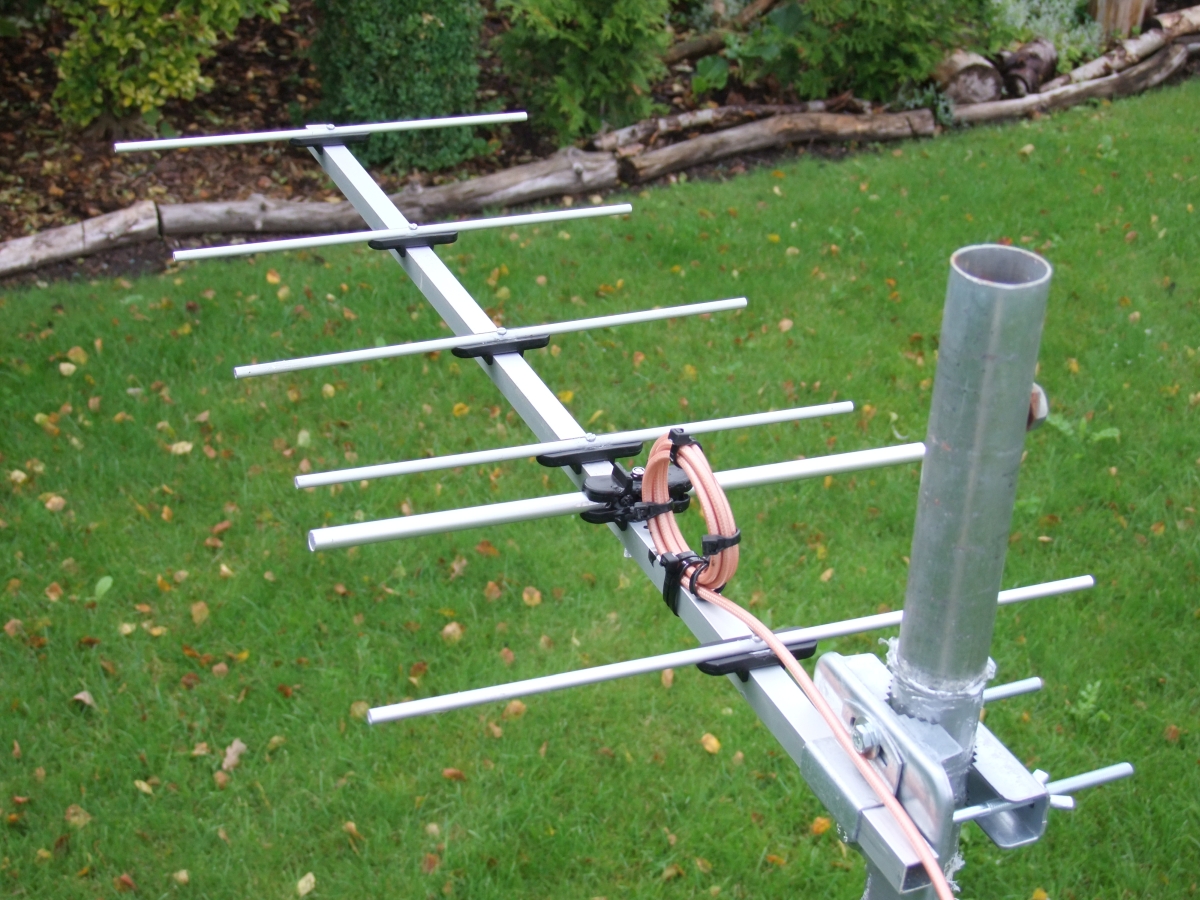
DIY 70 cm yagi 6 elements

Figure 1.

I needed a short 70 cm yagi for working the LEO satellites. In earlier years, I've had a 6-element yagi and I was satisfied with its performance. So I decided to build such an antenna.

Figure 2. 

The antenna measurements came from ON6MU. However, I made my own drawing (figure 2). All elements and the dipole were made according to the recommendations by ON6MU. Only the boom is a bit slimmer (15 x 15 mm instead of 20 x 20 mm). I had the tubes and the boom lying around, and assembly was easy. The measurements must be accurate down to the millimeter - and that was a challenge!


Figure 3.

The black element holders were found in the scrap-box. They were acquired some years ago from hfkits.com (link: Yagi element holder for 15x15 mm boom - HF kits). The balun is copied from innovantennas - they use the same concept. 4-5 tight loops of coax-cable prevents HF-currents running on the outside of the cable. I used 150 cm RG-400 teflon coax, and it was terminated with an N-connector. Figure 3 shows the balun before it was made water-proof.   

Figure 4.

Figure 4 shows how the dipole is mounted on the boom using 2 element holders. The dipole is isolated from the boom. The coax-cable center conductor is soldered to the left solder lug; and the coax braid to the right one.

I did not use stainless screws and mutters for assembly, so I painted all screws/mutters after fitting them to avoid corrosion. Where the coax-cable is connected to the dipole, the cable was secured against moisture. I used PlastiDip for this purpose. Otherwise, the braid may detoriate due to water ingress.

The antenna was mounted on a 1½" steel mast turned by a rotator (Yaesu G-600). From 7.5 meters above ground, the antenna heard two terrestical UHF beacons: OZ7IGY at 227 km (weak signal) and LA8UHF at 322 km (normal signal). I listened for the LEO satellite RS-44, and its beacon was heard at a distance of 4000 km. The antenna works to my satisfaction, and I'll use it from now on!

Antenna SWR is 1.3 between 432-438 MHz, and this figure is satisfactory.  

torsdag den 26. januar 2023

My first DXCC diploma

My first DXCC diploma arrived in the mail today. Shipping from USA to Denmark took 16 days. The mode is Mixed because CW and FT8 were used for my QSOs with 100 different entities (countries).


I have applied for DXCC before. It was around 1994. I sent QSL cards from 100 different countries to ARRL Headquarter in Connecticut. But my shipment newer arrived. It was called for in the postal system, but the envelope newer showed up - it was lost. Replacing 100 QSL cards is difficult, so I gave up DXCC for many years.  

I started with FT8 last year, and after some time, I discovered that DXCC was within reach. Another factor was Logbook of the World (LotW). This tool did not exist back in 1994, and LotW makes QSO confirmations fast, easy, and cheap. Many FT8 stations are using LotW for confirming their contacts. My DXCC diploma was confirmed by LotW for 94 entities, and QSL cards for 6 entities. The cards were checked by OZ1ACB who is the ARRL card checker in Denmark. 

Are there other diplomas in the pipeline? Yes, I am seeking QSOs for the QRP DXCC diploma, where all contacts must take place using a maximum of 5 W RF power on my side. Current status is 97 entities.   

73 from OZ1BXM Lars

Homepage: oz1bxm.dk

søndag den 8. januar 2023

First QSO via Greencube satellite

Greencube is an exciting satellite. The orbit is MEO (Medium Earth Orbit), and the average distance to Earth is 6,800 km. Greencube carries seeds for plants to grow under microgravity conditions.The results of this project will allow production of vegetables in space to support future human space missions. Future astronauts will have access to fresh and nutritious food along their journey!  

Greencube

Greencube in the lab. Photo: Italian Space Agency.

Greencube is a tiny satellite measuring 10 cm x 10 cm x 30 cm. It was launched by ESA from French Guiana on 13. July 2022. NORAD ID is 53106. AMSAT has designated the satellite IO-117. The satellite carries a digipeater for ham radio operating at 435 MHz. 

IO-117 footprint

Greencube footprint (www.n2yo.com)

I've decided to operate via Greencube. The footprint is huge compared to the current LEO satellites. I have never tried operating a digipeater before. The distance to the satellite is between 6,800 km and 10,000 km. There are some challenges here!

Ground station

OZ1BXM ground station for Greencube.

My ground station for Greencube is a Yaesu FT-847 VHF/UHF transceiver. Greencube software runs on my Windows 10 computer. My antenna is a 9-element X-Quad (vertical polarization) controlled by 2 rotators, one for azimuth and one for elevation.

The challenge was installing the software. There were in total 6 different programs to install and configure. It took me several long days to complete.

I had my first QSO via IO-117 on January 6th with S57NML in Slovenia. It was fun and challenging. Later followed a QSO with W5CBF in Louisiana, USA. There is plenty of DX to chase on this satellite!

Link: ZR6TG Adventures with Greencube Satellite

Link: Tracking Greencube: https://www.n2yo.com/?s=53106

73 from OZ1BXM Lars, oz1bxm.dk

mandag den 5. december 2022

I've worked 100 entities using FT8

In July 2022, I challenged myself to pursuing 100 entities using FT8 and wire antennas. The pursuit is over now as I worked entity #100 on the 1st of December. The challenge lasted nearly 5 months.

The 100 entities are listed here: http://oz1bxm.dk/100-lande-ft8.html

My 100 entities distributed on continents.

The figure above shows the 100 worked entities distributed on continents. Most entities were from EU (Europe) and AS (Asia). Less frequent were AF (Africa) and NA (North America). SA (South America) and OC (Oceania) contributed with 8 entities. The reason for the EU majority: Living in Denmark makes it easy for me to contact European entities, and there are many of them!

My 100 entities distributed on frequency band.

The figure above shows the 100 worked entities distributed on frequency bands. I've worked most entities on the 20 meter and 15 meter bands. I've worked only 2 entities on the 80 meter band (the antenna was too short on 80 meters). The remaining bands contributed almost the same number of entities.

I've used low output power (20 W or less) for 99 of the entities. Only in one case 80 W was used. My antenna was a dipole (entity 1-70) and a horizontal wire loop 43 m long (entity 71-100).

Vy 73 from OZ1BXM

søndag den 10. juli 2022

In Pursuit of 100 Entities using FT8

I've decided to challenge myself and pursuit 100 entities using FT8. My experience with FT8 is not long as I've had only 25 QSO's in that mode. The goal of 100 entities should be achivable this year as the sunspot level is growing every month and good conditions can be expected on the upper HF-bands. The graph below shows how sunspots are increasing right now. 


Increasing sunspots during 2022. 

My antenna for the FT8 challenge is shown below. It is a centerfed wire dipole measuring 2 x 10 meters. The highest point is 7 meters above ground. The automatic ATU in the attic keeps SWR low on the coax-cable. 


 Wire antenna at OZ1BXM.

If you would like to monitor my progress, you can visit this page where my worked entities are listed: 

Vy 73 from OZ1BXM
My homepage: http://oz1bxm.dk/

tirsdag den 26. april 2022

Operating 144 MHz EME again

After some years of non-activity, I've decided to operate 144 MHz EME again. The equipment is in store, and I want continue in this exciting branch of ham radio. Full description of my EME station: http://oz1bxm.dk/eme/eme-station.html 

The different categories within 144 MHz EME stations are shown below.

Category     Ant-gain     Example antenna

Monster     24 dBd         16 x 9 element yagi

Big     21 dBd         8 x 9 element yagi

Mid-size     18 dBd         4 x 9 element yagi

Small     15 dBd         2 x 9 element yagi

QRP     12 dBd         1 x 9 element yagi

I've assembled a small EME station with 15 dBd antenna gain. The antenna array is 4 x 6 element yagi which provides 15 dBd gain. The picture below from 26-april-2022 shows my array.  

4 x 6 yagi for 144 MHz EME at OZ1BXM.

Azimuth rotor is Yaesu G-600 and elevation rotor is Kenpro KR-550. Both rotors are controlled by PSTRotator running on my Windows 10 PC.

I'll be a frequent visitor to the N0UK EME chat where EME-amateurs meet and arrange skeds.

I hope to work many initials in the time to come!

73 from OZ1BXM Lars Petersen, oz1bxm.dk

torsdag den 1. juli 2021

Mains power alarm

Our refrigerator must run at +5C at all times. But one day, the security relay of the house flipped and cut the power off. The power outage lasted 6 hours, and the temperature within the refrigerator rose to +15C. To avoid this in the future, I decided to build a mains power alarm, so I can take action if the power relay flips again.

Figure 1. Mains Power Alarm.

The PSU is connected to the mains and generates 12 V which energizes the relay coil. The relay is in position NO. If 12 V is lost, the relay changes to NC and activates the buzzer. SW1 can silence the buzzer.

The PSU in figure 1 is an AC adapter which is plugged into a 230 V AC wall outlet. The secondary of the AC adapter delivers 12 V DC. The green 12V lamp is on when 12 V DC (and mains) is present. Relay1 is active and breaks the buzzer circuit. The relay is a 12 V type. Any voltage transcients from the relay coil are bridged by D1 and will not damage the PSU.
 
The 12 V buzzer sounds when the coil of Relay1 is powered off during a mains power failure.   

Figure 2. PSU and metal box.

 The metal box in figure 2 measures 125 mm x 80 mm x 50 mm. The blue relay is taped to the wall.  


Figure 3. Front view.

Figure 3 remarks. Labels are in the Danish language. 

ALARM TIL means "Alarm is on".
LYSNET OK means "Mains Ok".

73 from OZ1BXM Lars
Homepage: oz1bxm.dk

torsdag den 17. juni 2021

Reading I2C addresses

Many electronic modules are controlled by the I2C-protocol. I2C builds upon the concept of masters and slaves connected via a 2-wire bus. There are two pull up resistors. Each of them should be higher than 1 kohm. Vdd is 3.3 V DC or 5 V DC. The wiring is shown in figure 1.
Figure 1. Wiring of I2C.

I2C bus speeds range from 100 kbit/s in Standard mode, 400 kbit/s in Fast mode, 1 Mbit/s Fast mode plus, and 3.4 Mbit/s in High Speed mode. Each master and each slave has its own, unique 7-bit address.

The I2C scanner is shown below in figure 2. The scanner software is running on my Arduino UNO R3. There are 4 wires connected to the slave unit.

+5V is connected to Vin on the slave
GND is connected to GND on the slave
A4 is connected to SDA on the slave
A5 is connected to SCL on the slave

The UNO is powered via an USB cable.

Figure 2. I2C scanner with Arduino UNO.

Figure 3. Output from the I2C-scanner

Output from the scanner is displayed in the Arduino IDE. Select Tools > Serial Monitor. An example output is shown in figure 3. 

The Arduino I2C address scanner was created by Arbi Abdul Jabbaar and it is described here:

73 from OZ1BXM Lars
Homepage: oz1bxm.dk

lørdag den 1. maj 2021

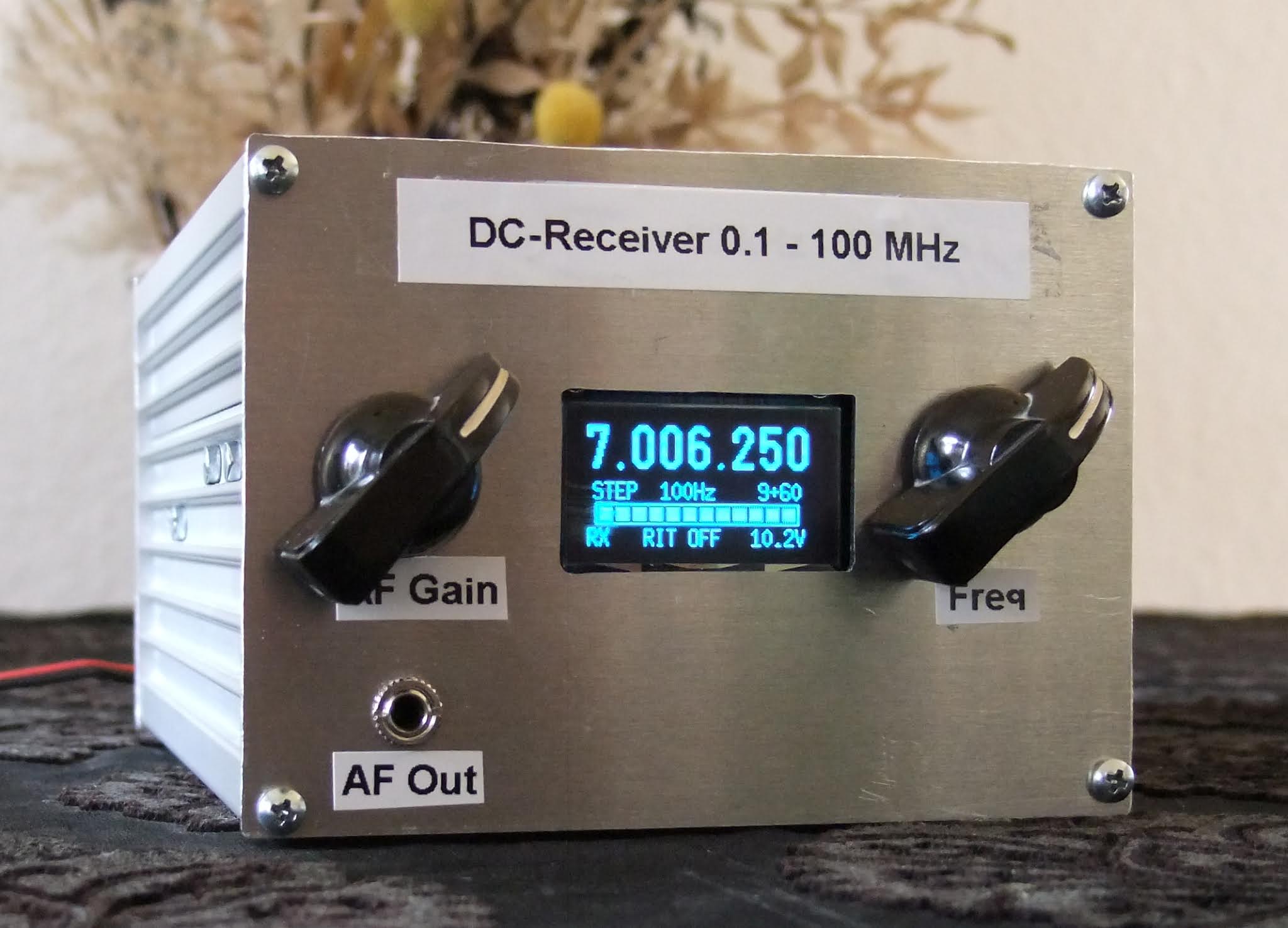
DC-receiver 0.1-100 MHz

Fig. 1. DC-receiver seen from the front.

Building your own equipment is not difficult if you buy ready-made modules and connect them together. I wanted to to build a DC (Direct Conversion) receiver with a broad frequency range. 

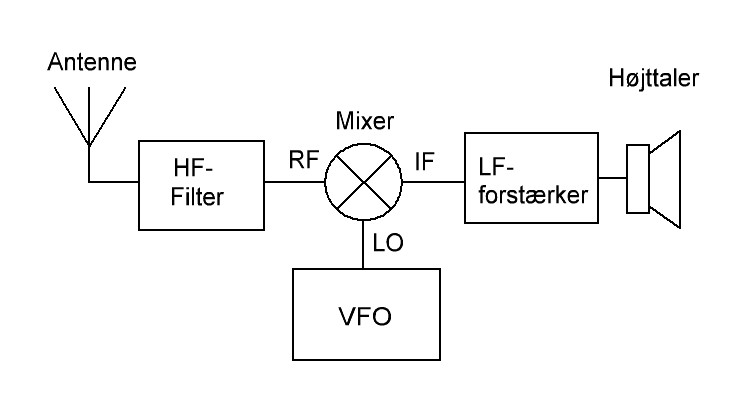
Fig. 2. Direct Conversion concept.

The concept of Direct Conversion is shown in figure 2. Four modules make up a SSB/CW receiver, and all modules can be obtained ready-made!

HF-filters are usually sold as kits or ready-made. I decided to make my own filter using a piece of Veroboard. The filter's circuit diagram and the Veroboard are shown below. 
Fig. 3. The 7 MHz bandpass filter.


Fig. 4. The filter is build with leaded components on a piece of Veroboard.

The mixer is a ready-made board centered around AD831. AD831 is an active, double-balanced mixer from Analog Devices and it runs on 10 V DC at 100 mA. The required LO level is just -10 dBm and max. input on the RF-port is +10 dBm.

Fig. 5. Active mixer 0.1 - 500 MHz.

The AF-amplifier is the well-known LM386 having 46 dB amplification. I tried to find a modern substitute, but that was difficult. Many audio ICs amplify something like 26 dB, and that is too low for DC-receivers which require 40 dB amplification or more.

Fig. 6. AF-amplifier with LM386.

The VFO is the ARDU-5351 kit sold by qrphamradiokits.com. The kit includes an OLED display, a rotary encoder, a frequency generator module (Si5351A), and the Arduino Nano. I soldered all parts onto the motherboard except the Nano, which is fitted using sockets. There was no soldering of SMD-components.

Fig. 7. The VFO kit.

As the VFO output is 7 dBm, I've added a 20 dB attenuator to lower the output and comply with the LO port level of the active mixer.

Components for power distribution and the S-meter rectifier are fitted on a piece of Veroboard as shown in figure 8 below.

Fig. 8. The 10 V power supply and the S-meter rectifier.


Fig. 9. Circuit diagram.

All modules are fitted into a metal enclosure which I acquired from Conrad Electronics (item 522953). The enclosure's front is seen in figure 1 above, and the rear is seen in figure 10 below. Figure 11 shows the open enclosure.

Fig. 10. Rear side of the DC-receiver.

Fig. 11. The DC-receiver with lid removed.

Vy 73 from OZ1BXM Lars

Homepage: http://oz1bxm.dk/ 

tirsdag den 29. december 2020

One-valve transmitter for 7 MHz


Fig. 1. Valve transmitter.

Building this transmitter was inspired by an article in "Popular Electronics" 2/1955. The circuit diagram is simple, and the valve (6AQ5) can still be purchased. So I decided to build the project.
Fig. 2. Circuit diagram.

I find the circuit diagram clever. C6 and L3 are mounted on top of the chassis, and may be touched by the operator. However, the B+ voltage is neither available at the variable capacitor C6 nor at the coil L3. This is because C5 isolates the two components from B+, and they are both grounded. This precaution increases electrical safety.

High voltage is present at the bottom of the chassis. I decided to cover all components with high-voltage by plexiglass to avoid danger of electrical shock. 

Fig. 3. Top view.

Fig. 4. Bottom view. Note the plexiglass walls. 

The power supply is unregulated. When current is drawn during transmit, the B+ goes down from 215 V to 185 V, and this reduces the transmitter output to 2 W.
Fig. 5. Power supply for the transmitter.

I wish you a happy New Year, and hope for better times next year without corona-virus!

73 OZ1BXM Lars
Homepage: oz1bxm.dk
 

tirsdag den 6. oktober 2020

Replacing Network Time with BktTimeSync

I've used Network Time about 6 months. However, the PC clock deviation could be 500 ms or more during a day. This amount of drift is not acceptable - digital modes like JT65 and FT8 require less than 100 ms deviation in order to run smoothly.

blog post by N1RWY directed me to BktTimeSync by IZ2BKT Capelli Mauro.

Main page and software download: BktTimeSync 
Alternative page for download: https://bkttimesync.software.informer.com/


Fig. 1. BktTimeSync configuration. 

My configuration is shown in figure 1. Note that connecting to an NTP-server works only if the PC firewall allows traffic on port 123. "GPS Configuration" is not filled in as I don't use a GPS device as time source.

BktTimeSync should run automatically when the PC starts up. How to add an app to run automatically at startup in Windows 10 is described by Microsoft support

Fig. 2. Message from time.is: You have the exact time!

Checking your PC clock can be done by visiting time.is. You'll discover if your PC clock is off. Figure 2 shows, that my PC clock has the exact time, and the deviation is just 6 ms.

I hope BktTimeSync will continue its excellent timekeeping on my PC!

Note december 2020: BktTimeSync is still running on my Win 10 PC. System time is updated every 20 min via europe.pool.nt.org. I am satisfied with it's performance.

73 OZ1BXM Lars

Homepage: oz1bxm.dk

søndag den 27. september 2020

New 23 cm transverter from SG-LAB

My new 23 cm transverter comprises a transverter module and a PA module. Both modules came fully assembled and tested from SG-LAB in Bulgaria. The transverter version is 2.3. It has an optional input port for a GSPDO (10 MHz).

Fig. 1. 23 cm transverter block diagram.

The transverter's IF is 144 MHz. RF output is 1296-1298 MHz at 2 W which is raised to 25 W using the PA. Both units have two multi-color LEDs on the front:
  • Input power LED
  • Output SWR LED
When a LED is green, all is well. Yellow means warning, and red means a dangerous condition. Figure 2 below shows "all well" on the PA module to the right. The transverter LEDs display yellow and green. The reason for yellow is low input power. This is necessary not to overload the PA module. 


Fig. 2. LED indications on transverter and PA during transmit.

The IF-transceiver is Yaesu FT-847. It has a STBY port on the rear panel which goes low during TX. The STBY port is connected to the transverter's PTT port via a coax-cable.  


Fig. 3. Transverter and PA inside the alu-box. 

Figure 3 shows the transverter and the PA mounted inside a Hammond 1550J alu-box. The RF ports on both modules are fitted with SMA-female connectors. The modules are interconnected with short pieces of RG316D cable having SMA-male connectors. 

The PA  module becomes warm, but not hot during transmit. The PA module contains a pre-amp with 10 dB gain and NF 0.8 dB.


Fig. 4. The transverter is mounted below the 23 cm antenna.

The water-proof alu-box containing the transverter is mounted below the 23 cm antenna (fig. 4). The middle antenna is a 10-element yagi for 70 cm, and the lower antenna is a 6-element yagi for the 2 meter band.